The VicoHome app is a powerful tool for managing your home security system, offering advanced features like real-time monitoring, instant notifications, and two-way communication. Installing the app on your Android device is a straightforward process, and with just a few steps, you’ll be ready to enhance your home’s safety. This guide provides detailed instructions on downloading, installing, and setting up the VicoHome app for Android, ensuring a smooth experience for first-time users.
Check Compatibility:
Before proceeding, ensure your device meets the minimum requirements for the VicoHome app. Most modern smartphones and tablets running Android 5.0 or later are compatible. To check your device’s operating system:
Go to Settings > About Phone.
Look for the "Android Version" field.
If your device is outdated, consider updating your operating system before installation.
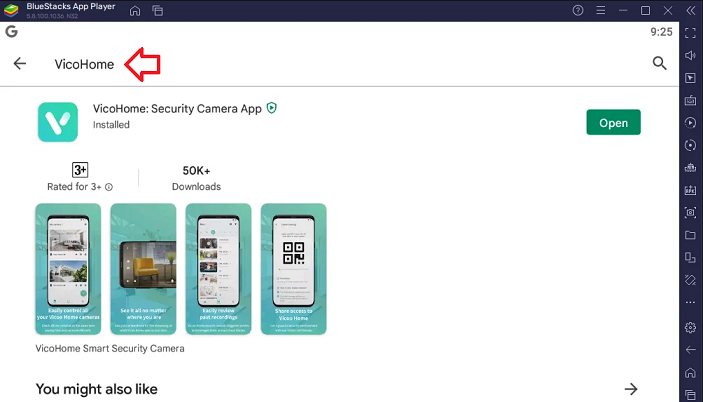
The VicoHome app is available for free on the Google Play Store. Follow these steps to download it:
Open the Google Play Store: Locate and tap the Google Play Store icon on your device.
Search for VicoHome: Use the search bar at the top and type “VicoHome Security Camera App.”
Select the App: Look for the app with the official VicoHome logo and tap it.
Install the App: Click the green Install button. The app will begin downloading and installing automatically.
Wait for Completion: Once the installation is finished, you’ll see the option to open the app directly from the Play Store.
Must Read: Download VicoHome App on your Windows & Mac
When you launch the VicoHome app for the first time, it will request certain permissions to function effectively. These permissions include access to:
Camera and Microphone: For two-way audio communication and setup.
Storage: To save and retrieve video recordings or snapshots.
Location: For location-based features, such as timestamping events.
Grant these permissions when prompted to ensure optimal app performance.
To start using the app, you’ll need a VicoHome account:
Open the App: Tap the VicoHome icon on your home screen or app drawer.
Sign Up: If you’re a new user, click on Create Account and enter your email address, set a strong password, and follow the verification steps.
Log In: Existing users can simply enter their credentials to access the app.
Once logged in, you can pair your VicoHome-compatible security cameras with the app from your Android device. Follow these steps:
Power On Your Camera: Ensure the security camera is powered and in pairing mode.
Add a Device: In the app, tap the + icon or Add Device button.
Scan QR Code or Enter Serial Number: Depending on your camera model, you may need to scan a QR code or input a unique serial number.
Connect to Wi-Fi: Select your home’s Wi-Fi network and enter the password. Ensure the network is 2.4GHz, as some cameras may not support 5GHz networks.
After successfully connecting your camera, take a moment to customize your settings:
Enable Notifications: Turn on push notifications to receive real-time alerts.
Set Activity Zones: Specify areas within the camera's view to focus on, reducing false alarms.
Test Features: Explore live streaming, two-way audio, and recording options to familiarize yourself with the app.
Also Read: Get VicoHome app on your iOS device
If you encounter issues during installation:
Check Your Internet Connection: A stable Wi-Fi or mobile data connection is crucial.
Clear Cache: Go to Settings > Apps > VicoHome > Storage and clear cache if the app doesn’t launch properly.
Restart Your Device: Rebooting often resolves temporary glitches.
Final Thoughts
Installing the VicoHome app on your Android device is the first step toward building a safer and smarter home. Its user-friendly interface and robust features make it an essential companion for modern security systems. Follow the steps above, and you’ll be ready to monitor and manage your property’s security with ease. Start your journey to peace of mind by downloading the VicoHome app today!